In today’s digital-first world, your website is often the first impression users have of your brand. A well-designed website builds trust, improves user experience, and drives conversions. Whether you’re creating a new website or improving an existing one, following proven web design best practices ensures your site is functional, user-friendly, and visually appealing.
This guide covers the essential principles every modern website should follow.
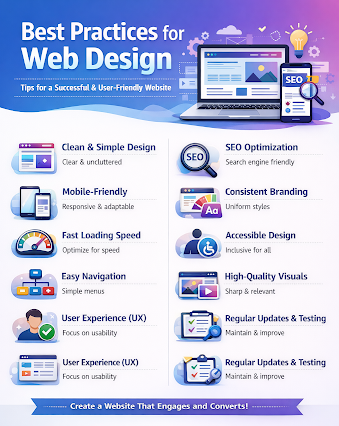
1. Keep the Design Simple and Clean
A cluttered website confuses users and reduces engagement. Simplicity improves readability and navigation.
Best practices:
- Use clear layouts with enough white space
- Avoid excessive colors and fonts
- Focus on essential content only
- Keep design consistent across all pages
A clean design helps users find information quickly and stay longer on your site.
2. Make Your Website Mobile-Friendly
With most users browsing on mobile devices, responsive design is no longer optional.
Best practices:
- Use responsive layouts that adapt to screen sizes
- Ensure buttons and menus are easy to tap
- Optimize images for fast loading on mobile
- Test your website on different devices
Mobile-friendly websites improve both user experience and search engine rankings.
3. Improve Website Loading Speed
Slow websites lose visitors. Page speed directly impacts bounce rate, SEO, and conversions.
Best practices:
- Compress images and media files
- Minimize CSS, JavaScript, and HTML
- Use rliable hosting and caching
- Avoid unnecessary animations or heavy plugins
A fast website creates a smoother experience and encourages users to explore more pages.
4. Use Clear Navigation
Navigation should be intuitive so users can find what they need without effort.
Best practices:
- Keep menus simple and organized
- Use descriptive labels for pages
- Include a search bar for large websites
- Add internal links to guide users
Good navigation improves usability and reduces frustration.
5. Focus on User Experience (UX)
Great web design is not just about appearance—it’s about how users interact with your site.
Best practices:
- Design with user goals in mind
- Ensure content is easy to read
- Use clear call-to-action (CTA) buttons
- Remove distractions that affect usability
When users enjoy their experience, they are more likely to convert and return.
6. Maintain Visual Consistency
Consistency strengthens branding and makes your website look professional.
Best practices:
- Use the same color scheme throughout
- Keep typography uniform
- Follow a consistent layout structure
- Align images and elements properly
This creates a cohesive and trustworthy brand presence.
7. Optimize for Search Engines (SEO)
A beautiful website is useless if people can’t find it.
Best practices:
- Use SEO-friendly URLs
- Optimize headings (H1, H2, H3
- Add alt text to images
- Use relevant keywords naturally
- Ensure fast loading and mobile responsiveness
SEO-optimized design increases visibility and organic traffic.
8. Prioritize Accessibility
Accessible websites ensure that everyone, including users with disabilities, can use your site.
Best practices:
- Use readable fonts and good color contrast
- Add alt text for images
- Make forms and buttons keyboard-friendly
- Use proper heading structures
Accessibility improves usability and helps meet legal and ethical standards.
9. Use High-Quality Visuals
Images, icons, and videos should enhance your content—not distract from it.
Best practices:
- Use high-resolution but optimized images
- Avoid stock photos that feel generic
- Keep visuals relevant to your message
- Maintain a consistent style
Strong visuals make your website more engaging and memorable.
10. Regularly Update and Test Your Website
Web design is not a one-time task. Continuous improvement keeps your site competitive.
Best practices:
- Monitor user behavior with analytics tools
- Fix broken links and outdated content
- Test forms, buttons, and loading speed
- Update design based on trends and user feedback
Regular maintenance ensures long-term performance and relevance.
Final Thoughts
Following best practices for web design helps you create a website that is visually appealing, easy to use, fast, and optimized for both users and search engines. A well-designed website not only improves brand credibility but also increases engagement, leads, and conversions.
Whether you’re a business owner, developer, or blogger, applying these principles will help you build a website that truly delivers results.
For More Info Visit:- techtribemag.com