If your UX team keeps losing time between messy ideas, endless revisions, and confusing developer handoff, the real problem is not creativity. It is using the wrong workflow for the stage of design. The smartest fix is to use wireframing tools that help your team move from rough thinking to testable layouts fast, while keeping everyone aligned in one shared process.
In 2026, this matters more than ever for US-based product teams. Startups need faster MVP validation, SaaS companies need smoother sprint cycles, and enterprise teams need stronger documentation. The best tools now do more than draw boxes. They help with collaboration, AI-assisted drafts, user flows, accessibility checks, and clean engineering handoff.
This guide explains the best options in simple terms so designers, founders, product managers, and UX researchers can easily understand which tool fits their real workflow.
What Makes A Great Wireframing Tool In 2026
A solid tool should solve the most common UX pain points: slow ideation, scattered feedback, and design-to-dev mismatch.
The best choices usually include:
- Real-time team collaboration
- Low-fi and mid-fi wireframe support
- Reusable components
- Fast comments and approvals
- AI-generated layout suggestions
- Developer specs and handoff
- User flow mapping
- Accessibility-friendly structure planning
For most US teams, the sweet spot is reducing tool switching. If your team brainstorms in one place, sketches in another, and documents in a third, things get messy real quick.
Figma
Figma is still the safest all-around choice for most UX teams in 2026.
It works because wireframes, flows, prototypes, and final UI can live in the same file. Your team can start with rough blocks, then gradually replace them with real components without rebuilding the whole experience. This saves a ton of time during sprint cycles.
Why It Works For Most Teams
- Great for remote US teams
- Browser-based collaboration
- Huge community wireframe kits
- Smooth design-to-dev handoff
- Easy stakeholder reviews
- Fast shift from low-fi to high-fi
For startups and agencies, this is often the no-brainer pick because product managers, designers, and developers can all work together without friction.
Balsamiq
Balsamiq is perfect when the goal is fast thinking, not polished visuals.
Its sketch-style interface keeps everyone focused on layout, navigation, and task flow. That is super helpful in workshops where clients or stakeholders tend to get distracted by fonts and colors too early.
Best For
- Discovery sessions
- MVP planning
- Early user flow testing
- Team workshops
- Client concept approvals
This is a strong fit for agencies and product teams that want quick clarity before moving into polished design.
Axure RP
For complex enterprise UX, Axure is still one of the strongest choices.
It handles advanced interactions, logic, variables, conditional states, and detailed documentation. This makes it ideal for healthcare, fintech, SaaS dashboards, and government systems in the US, where every interaction needs precision.
Where It Shines
- Multi-step enterprise workflows
- Role-based dashboards
- Logic-heavy onboarding
- Documentation for engineering
- Annotated specs for compliance
It has a steeper learning curve, but when complexity is high, it absolutely delivers.
UXPin
UXPin is best for mature product teams that care about design systems and engineering alignment.
Its biggest strength is code-backed components. That means your wireframes can behave closer to real production components, which reduces miscommunication with developers.
This is a great match for:
- Design system teams
- SaaS product companies
- Agile engineering squads
- Component-driven workflows
- Faster QA validation
If your dev team often says “this design is not build-ready,” UXPin helps solve that gap.
Whimsical And Miro
When UX work starts with messy ideas, user journeys, and whiteboard thinking, these tools are clutch.
Whimsical is awesome for fast flows and simple screens. Miro is stronger for team workshops, research synthesis, and mapping large user journeys on an infinite canvas. Real-world UX teams in 2026 still use this combo heavily during discovery.
A simple workflow looks like this:
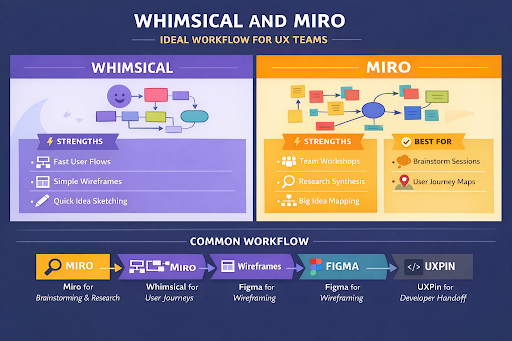
| UX Stage | Best Tool |
| Research Mapping | Miro |
| User Flows | Whimsical |
| Screen Wireframes | Figma |
| Dev Handoff | UXPin |
This keeps the process clean and easy to follow for all audiences, from junior designers to senior product leads.
How AI Is Changing Wireframing In 2026
AI is now speeding up early UX work in a big way.
Instead of building every screen from scratch, teams can generate first-draft layouts from short prompts, then refine the best ideas. This is especially useful for lean US startups validating products fast.
Popular AI-supported workflows include:
- Prompt-to-wireframe generation
- AI user flow suggestions
- Auto layout creation
- Accessibility issue detection
- Research-based design recommendations
Still, most professionals refine those drafts inside traditional wireframing tools because structure, usability, and testing still need human UX judgment.
How To Choose The Right Tool For Your Exact Audience
The best choice depends on who is using it.
For Founders And Startups
Use Figma or Whimsical for speed and validation.
For UX Agencies
Use Balsamiq for workshops and Figma for deliverables.
For Enterprise Product Teams
Choose Axure or UXPin.
For Cross-Functional Teams
Miro plus Figma works best.
The key is picking a tool your whole team can actually use, not just the designers.
Conclusion
The best UX teams in 2026 are not just choosing software. They are building faster, clearer decision-making systems.
For most US audiences, Figma remains the best all-rounder, while Balsamiq, Axure, UXPin, and Miro each solve different stages of the design process. The smartest move is to match the tool to your workflow, team size, and project complexity.Once your team uses the right wireframing tools, feedback gets clearer, handoff gets smoother, and ideas turn into user-tested experiences way faster. That is the real win.
For More Info Visit:- techtribemag.com